


You've published good pages, waited weeks, and your website is still not ranking on Google's first page. It's frustrating, and it usually isn't bad luck. Something specific is holding you back, and most of the time you can find it and fix it yourself.
This guide is for website owners, marketers, and business owners who want a clear reason their site isn't on page one and a plan to change it. We start with a fast diagnosis, then work through every common cause, from indexing to content to links.
In this guide you'll learn:
-
How to tell which ranking problem you actually have
-
Whether Google can even find and index your pages
-
If your content matches what searchers want
-
Which technical fixes genuinely move rankings
-
A realistic 30-60-90 day plan to climb to page one
1. Quick Diagnosis: Why Your Website Is Not Ranking on Google's First Page
Before you fix anything, find out which of three problems you have: your pages aren't indexed, they're indexed but invisible, or they're stuck on page two. Each one needs a different fix, so guessing wastes weeks.
1.1 Not indexed vs. indexed but invisible vs. stuck on page 2
"Indexed" means Google has saved your page in its library and can show it in results. A page that isn't indexed can't rank at all. A page that's indexed but invisible exists in Google's eyes, but Google doesn't think it's worth showing for your target searches. A page stuck on page two is close: Google trusts it, but ranks competitors higher.
1.2 The 5-minute self-audit
Run three quick checks:
-
Type site:yourdomain.com into Google. Few or no results means an indexing problem, and it also tells you if your website's not showing on Google at all.
-
Open Google Search Console, the free Google tool that reports how your site does in search, and check the Pages report for how many pages are indexed.
-
Search your brand name, then a non-branded phrase you want to rank for. Showing up for your brand but not the phrase points to a content or competition problem, not an indexing one.
2. Can Google Crawl and Index Your Website? (Fix This When Your Website's Not Ranking)
If Google can't crawl and index your pages, nothing else matters, because an unindexed page has zero chance of ranking. Rule this out first. Crawling is when Google's bots visit and read your pages; indexing is when it stores them to show in results.
2.1 Indexing errors in Google Search Console
The Pages report in Google Search Console lists pages Google didn't index and why. A common one is "Crawled – currently not indexed," which means Google saw the page but didn't find it valuable enough yet. Fix the stated reason, then click Validate so Google rechecks.For a step-by-step walkthrough, see our guide on how to fix Google indexing issues in Search Console.
2.2 Robots.txt, noindex tags, and canonical mistakes
A robots.txt file tells search engines which pages they're allowed to crawl, and one wrong line can block your whole site. A "noindex" tag tells Google to keep a page out of results, which is fine for a thank-you page but a disaster if it's left on your main pages by accident. A canonical tag points Google to the main version of a page; if every page points to your homepage, the rest can quietly drop out.
2.3 XML sitemap and crawl budget issues
An XML sitemap is a list of your important pages that you submit in Search Console so Google finds them faster. Crawl budget is how many pages Google will crawl in a given window; small sites rarely hit a limit, but thousands of thin or duplicate URLs waste it. Submit a clean sitemap and remove junk pages.

3. Are You Targeting the Right Keywords?
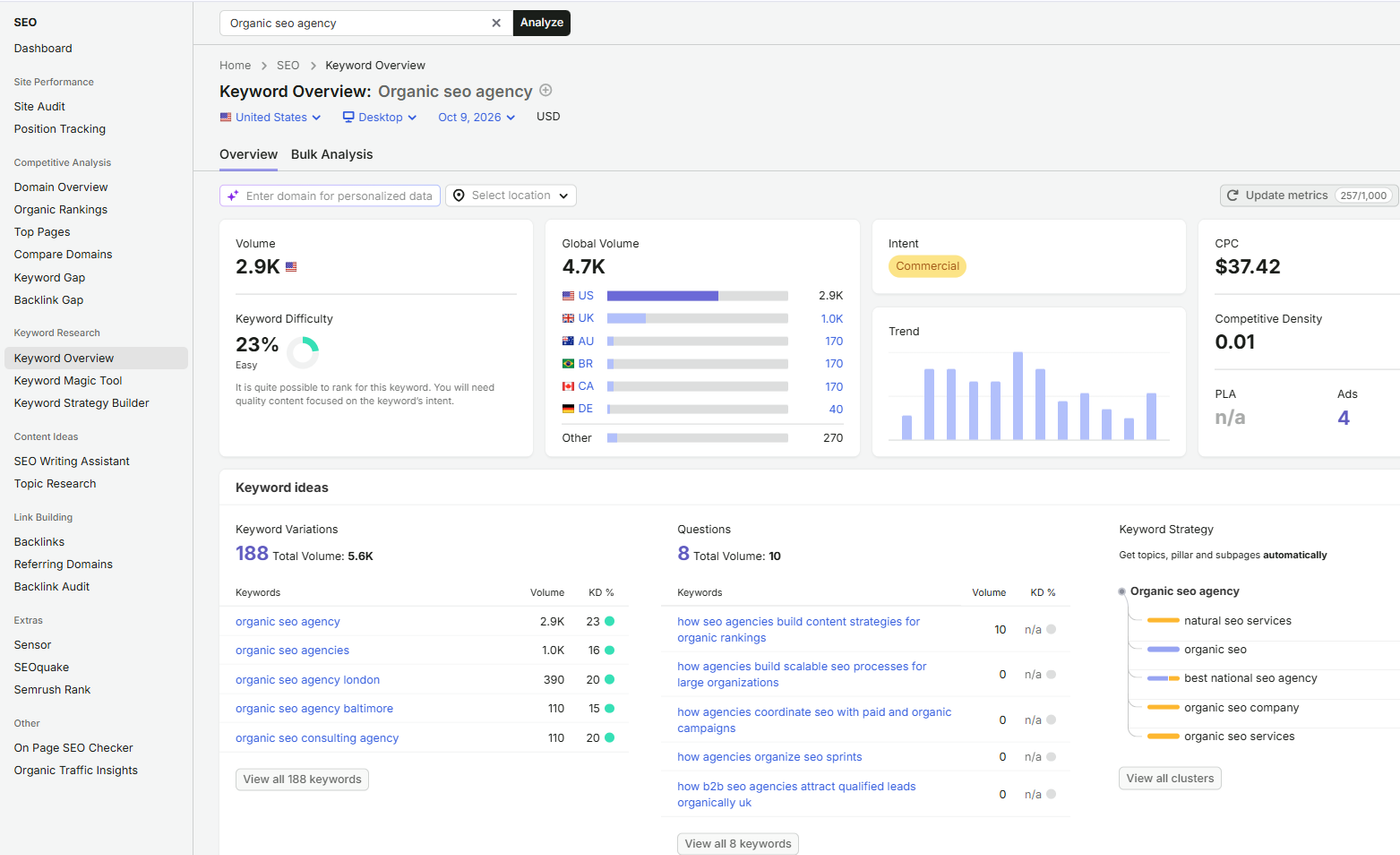
One big reason why your website is not ranking is that you're chasing keywords too competitive for your site right now. Picking winnable terms is half the battle.
3.1 Keyword difficulty vs. your domain authority
Keyword difficulty estimates how hard a term is to rank for. Domain authority is a rough score of how strong your site looks to search engines. A new site aimed at high-difficulty keywords loses to established brands every time, so start where you can realistically win.
3.2 Short-tail vs. long-tail vs. low-competition opportunities
Short-tail keywords like "shoes" are broad and brutal to rank for. Long-tail keywords like "waterproof running shoes for flat feet" are longer, more specific, and far easier to win. Go after these early, then move up.
3.3 Keyword cannibalization: when your own pages compete
Cannibalization is when two or more of your pages target the same keyword, so they split signals and confuse Google about which to show. Merge the pages or give each a clearly different focus.
3.4 Topic clusters and semantic keyword coverage
A topic cluster is one main "pillar" page linked to several related pages. Building these earns topical authority, the trust Google gives sites that cover a subject thoroughly. Answer the related questions around your keyword, not just the keyword itself.
4. Does Your Content Match Search Intent?
If your page doesn't match search intent, the reason behind the words a person types, Google won't rank it no matter how good it is. Matching intent is the single biggest content fix for most sites.
4.1 Informational, commercial, transactional, and navigational intent
Every search has a goal. Informational means someone wants to learn ("how does SEO work"). Commercial means they're comparing before buying ("best SEO tools"). Transactional means they're ready to act ("buy SEO software"). Navigational means they want a specific site ("Search Console login"). If you write a sales page for an informational query, you've already lost.
4.2 How to reverse-engineer the SERP
The SERP is the search engine results page. Search your target keyword and study page one: Are the top results guides, product pages, or videos? How long and detailed are they? What angle do they take? Match that format and depth, then do it better.
4.3 Content gaps your competitors already cover
Open the top three ranking pages and list the questions and subtopics they answer that you don't. Those gaps are often the exact reason you sit on page two. Fill them in a way that's clearer and more complete.
5. Does Your Content Demonstrate E-E-A-T?
E-E-A-T isn't a single ranking dial you turn up; it's the quality framework Google's systems and human reviewers use to judge whether content is helpful and trustworthy. Show you're a real, qualified source and you're easier to rank.
5.1 Experience, expertise, authoritativeness, and trust signals
E-E-A-T stands for experience, expertise, authoritativeness, and trust. In plain terms: have you actually done the thing, do you know the subject, do others treat you as a source, and can readers trust your site? Trust matters most, especially for topics about money or health.
5.2 Author bios, original data, case studies, and citations
Add a clear author bio with real credentials. Back claims with your own data, examples, or screenshots instead of recycled generalities. Link to credible sources. These signals tell both readers and Google that a knowledgeable person stands behind the page.
5.3 Helpful Content and AI-generated content
Google doesn't penalize content just for being written with AI. What it rewards is helpful, people-first content, and what it demotes is mass-produced, low-value pages built mainly to game rankings. Use any tool you like, but make sure the result genuinely helps the reader.
6. How Do You Fix Technical SEO Issues Holding You Back?
Technical problems quietly cap your rankings by making pages slow, hard to crawl, or confusing for Google, even when your content is strong. Clear these and your good pages finally get a fair shot.
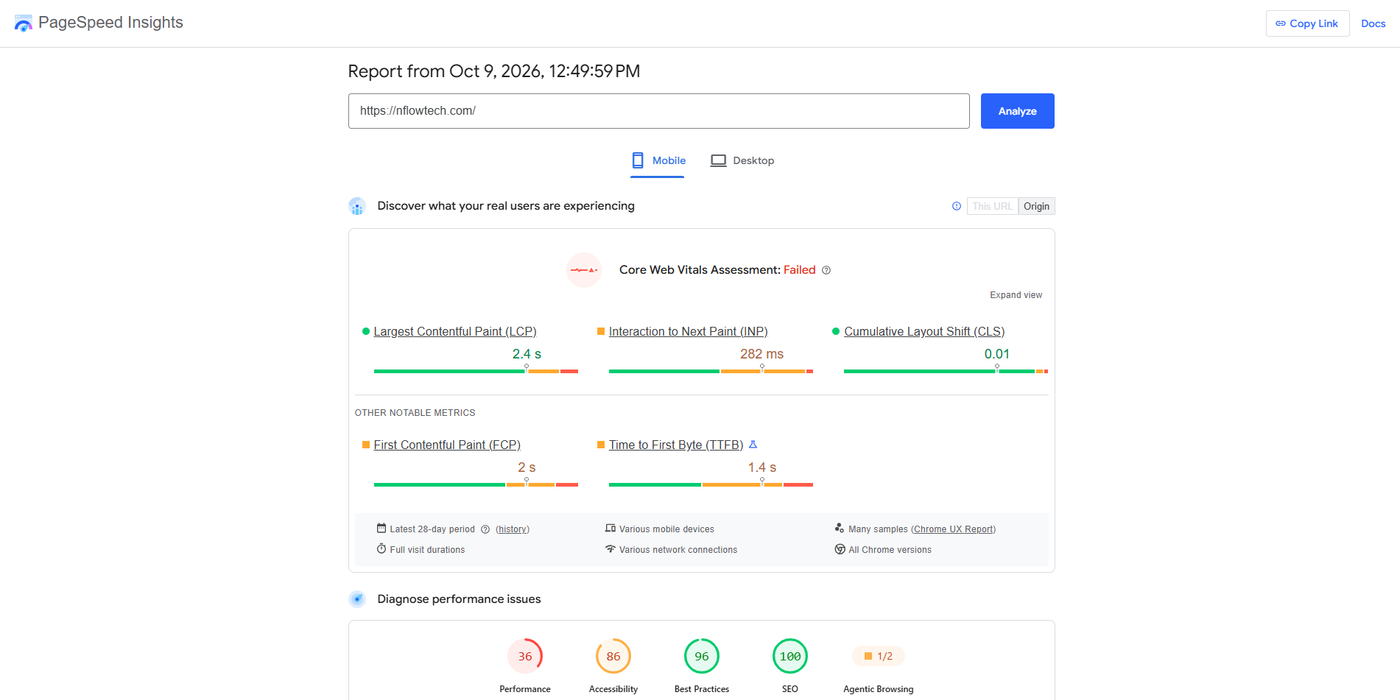
6.1 Core Web Vitals (LCP, INP, CLS) and page speed
Core Web Vitals are Google's measures of page experience. LCP (Largest Contentful Paint) is how fast the main content loads. INP (Interaction to Next Paint) is how quickly the page responds when you tap or click. CLS (Cumulative Layout Shift) is how much the page jumps around while loading. Aim for fast loads and stable layouts.You can measure all three in PageSpeed Insights.
6.2 Mobile-first indexing and responsive design
Google mainly uses the mobile version of your site to rank it. If your pages are hard to use on a phone, rankings suffer. A responsive design that adjusts to any screen size fixes this.
6.3 Site architecture, URL structure, and crawl depth
Keep important pages within a few clicks of your homepage. Crawl depth is how many clicks it takes to reach a page; the deeper it's buried, the less often Google visits. Use clear, readable URLs.
6.4 Schema markup and structured data
Schema markup is code you add to a page that explains its content to Google in plain terms, like marking up a recipe, review, or FAQ. It can earn rich results, the enhanced listings with stars or extra links that stand out in search.
6.5 HTTPS, redirects, broken links, and duplicate content
Serve your site over HTTPS (the secure version). Fix broken links and redirect chains, and make sure the same content doesn't live on several URLs, which splits your ranking signals.
7. How Can You Refresh and Improve Existing Content?
The fastest wins usually come from pages you already have that sit just below page one, not from writing brand-new content. A few upgrades can push them up in days, not months.
7.1 Finding "almost ranking" pages (positions 8-20)
In Google Search Console, open the Performance report and filter for pages ranking in positions 8 to 20. These are pages Google already likes but hasn't quite promoted. They're your best targets for quick improvement.
7.2 Content pruning, merging, and updating
Update stale pages with current information. Merge two weak pages on the same topic into one strong page. Prune, meaning remove or redirect, thin pages that add nothing, so your site looks stronger overall.
7.3 On-page optimization checklist
For each target page, tighten these:
-
Title tag: include the keyword, keep it compelling
-
Meta description: a clear summary that earns the click
-
Headings: use clear H2s and H3s that match what people ask
-
Images: add descriptive alt text and compress file size
-
Snippets: answer the main question in the first paragraph
8. Are Internal Links Helping or Hurting Your Rankings?
Internal links pass authority between your pages and tell Google which ones matter most, so weak internal linking can leave strong pages stranded. Fixing it is free and fast.
8.1 Orphan pages and link equity flow
An orphan page is a page no other page on your site links to, so Google rarely finds it and almost never ranks it. Link equity is the ranking value that flows through links. Make sure every important page is linked from somewhere relevant.
8.2 Anchor text best practices
Anchor text is the clickable words in a link. Use descriptive anchor text that tells readers and Google what the linked page is about, instead of "click here." Keep it natural and varied.
8.3 Pillar-to-cluster linking strategy
Link your detailed "cluster" pages up to the main "pillar" page on the topic, and link the pillar back down to each cluster. This hub-and-spoke pattern signals that you cover the subject in depth.
9. How Do You Build High-Quality Backlinks?
Backlinks, which are links from other sites to yours, still act as votes of confidence that help Google decide which pages to trust. Quality beats quantity every time.
9.1 Why links still matter
Search engines use links from other websites as a signal that your content is worth referencing. That logic hasn't changed and isn't likely to soon: a link from a respected site in your field carries real weight, while a pile of low-quality links does little or even harm you.
9.2 White-hat tactics
Stick to methods that earn links honestly:
-
Digital PR: create newsworthy content journalists want to cite
-
Guest posting on reputable, relevant sites
-
Linkable assets: original research, tools, or guides others reference
-
Broken link building: find dead links on other sites and offer your page as the replacement
9.3 Spotting and disavowing toxic links
Google says most sites never need the disavow tool, which asks Google to ignore certain links. Its systems already discount spammy links on their own. Only consider disavowing if you've bought links or been hit by a manual action and can't get bad links removed any other way.
10. Is Your Website Delivering a Great User Experience?
When visitors land, get what they came for, and stay, that behavior signals to Google that your page satisfies people, which supports your rankings over time. A frustrating page undoes good SEO.
10.1 Bounce rate, dwell time, and engagement signals
Bounce rate is the share of visitors who leave without interacting; dwell time is how long they stay before going back to search. Neither is a confirmed, direct ranking factor, but both are useful clues about whether your page actually answers the query. If people bounce fast, treat it as a sign to improve the page.
10.2 Navigation, readability, and intrusive pop-ups
Make navigation obvious, use short paragraphs and clear headings, and avoid pop-ups that cover the content as soon as someone arrives. Intrusive interstitials can hurt both the experience and your rankings.
10.3 Conversion-friendly design that supports SEO
A clean layout with clear next steps keeps people engaged and moving toward your goal. Good UX and good SEO pull in the same direction.
11. Local, Competitor, and SERP Feature Factors
Sometimes the issue isn't your page but the type of result Google shows, whether that's local listings, a stronger competitor, or a feature that pushes normal links down. Knowing the landscape tells you where the real opportunity is.
11.1 Local SEO and Google Business Profile
If you serve a local area, your Google Business Profile, the free listing that appears in Maps and local results, often matters more than your website. Fill it out fully, keep your name, address, and phone consistent, and gather genuine reviews.And if you run a site across several countries, targeting mistakes alone can leave a multi-country site with almost no Google traffic.
11.2 Competitor gap analysis
Look at who outranks you and ask what they have that you don't: more depth, more links, better structure, or clearer intent match. Close the biggest gap first.
11.3 Featured snippets, People Also Ask, and AI Overviews
Featured snippets are the boxed answers at the top of results. People also ask shows related questions. AI Overviews are AI-generated summaries(Here's what AI SEO is and why it matters.). To appear, answer questions directly and clearly near the top of your page, in a few plain sentences.
12. How Do You Track and Measure SEO Performance?
You can't fix what you don't measure, so a simple tracking routine shows whether your changes are actually working. Watch a few numbers that matter, not every number you can find.
12.1 KPIs that matter
Focus on impressions (how often you appear), click-through rate or CTR (the share of people who click when you appear), rankings for your target keywords, and organic conversions (visitors from search who take action). Rankings alone don't pay the bills; conversions do.
12.2 Essential tools
You only need a handful: Google Search Console for search data, GA4 (Google Analytics 4) for what visitors do on your site, Ahrefs or Semrush for keywords and links, and Screaming Frog to crawl your site for technical issues.Our GA4 setup guide walks through tracking leads, revenue, and ROI.
12.3 Building a monthly SEO reporting routine
Once a month, record your key numbers, note what you changed, and compare against last month. This habit turns guesswork into steady, visible progress.
13. How Long Does It Take to Rank on Google's First Page?
SEO typically takes several months to show meaningful traction, and competitive terms can take a year or more, so patience is part of the strategy. Anyone promising page one in days isn't being honest.
13.1 Realistic timelines by site age, niche, and competition
Three things set your timeline. A brand-new site takes longer than one with history, because trust builds slowly. A low-competition niche moves faster than a crowded one. And easy, long-tail keywords can rank in weeks, while head terms take many months. Expect early movement on the easy wins and a longer climb on the hard ones.
13.2 Why SEO takes time and what speeds it up
Google needs to crawl your pages, judge their quality, and watch how people respond before it trusts them on page one. You can speed things up by fixing technical blockers early, matching search intent closely, refreshing near-ranking pages, and earning a few quality links. None of this is instant, but steady work compounds.
14. 7 Common SEO Mistakes Behind a Website Not Ranking on Page One
Most stuck sites repeat the same handful of avoidable errors. Check yourself against these seven.
-
Blocking Google by accident. A stray noindex tag, a bad robots.txt line, or a broken canonical can keep pages out of results entirely.
-
Chasing keywords you can't win yet. Going after high-difficulty terms with a young site burns months for nothing.
-
Ignoring search intent. Publishing the wrong content type for the query means Google won't rank it, however polished it is.
-
Skipping technical SEO. Slow pages, poor mobile experience, and messy site structure quietly cap otherwise good content.
-
Weak internal linking. Orphan pages and vague anchor text leave your best pages without support.
-
Thin, me-too content. Pages that add nothing new give Google no reason to rank you over established competitors.
-
Giving up too soon. Many owners quit right before results arrive, since SEO rewards consistency over months.
15. Your 30-60-90 Day SEO Action Plan
Work in order: fix what's broken, optimize what you have, then scale, because building on a shaky foundation wastes effort. Here's how to spend the next three months.
15.1 Days 1-30: Fix technical foundations
Make sure Google can crawl and index your site. Clear indexing errors in Google Search Console, fix stray noindex and canonical issues, submit a clean sitemap, and sort out the worst Core Web Vitals and mobile problems. This is the groundwork everything else sits on.
15.2 Days 31-60: Optimize content and internal links
Find your near-ranking pages (positions 8-20), match them tighter to search intent, and refresh titles, headings, and opening answers. Fix orphan pages and add helpful internal links between related content.
15.3 Days 61-90: Scale content and build authority
Fill the content gaps competitors cover, expand your topic clusters, and start earning a few quality backlinks through digital PR or guest posts. Keep measuring monthly and double down on what's moving.
This framework comes from 4+ years of hands-on SEO work, fixing the same recurring problems across many sites.
16. Free SEO Checklist
Here's the whole guide boiled down to one checklist you can work through in order. Tick each item as you go.
Fix
-
Confirm pages are indexed with a site: search and the GSC Pages report
-
Remove accidental noindex tags and fix robots.txt
-
Check canonical tags point to the right pages
-
Submit a clean XML sitemap
-
Fix the worst Core Web Vitals (LCP, INP, CLS)
-
Make sure the site works well on mobile
-
Switch to HTTPS and fix broken links and redirects
Optimize
-
Match each page to the right search intent
-
Improve pages ranking in positions 8-20
-
Tighten titles, meta descriptions, and headings
-
Answer the main question near the top of each page
-
Add descriptive internal links and fix orphan pages
-
Merge or prune thin, overlapping pages
Scale
-
Build out topic clusters around your main subjects
-
Fill content gaps competitors already cover
-
Earn quality backlinks with white-hat tactics
-
Add author bios and original data for E-E-A-T
-
Track KPIs monthly and repeat what works
17. Conclusion
A website not ranking on Google's first page almost always has a findable cause, and now you have the map to find it. Start with the quick diagnosis, fix what's broken before chasing anything new, and give your changes a few months to take hold. Progress in SEO is steady, not sudden.
Work through the free checklist one section at a time, and if you get stuck on a specific issue, that's the moment to bring in a second pair of eyes.
FAQ
Why did my rankings suddenly drop?
A sudden drop usually points to one of a few things: a Google algorithm update that reassesses quality across the web, a technical change on your site like an accidental noindex tag, or a competitor improving their pages. Check Google Search Console for coverage errors and manual actions first, then compare the timing against known Google updates.
Can a new website rank on page one?
Yes, but it takes time and the right strategy. New sites rank fastest by targeting low-competition, long-tail keywords where established brands aren't competing hard. Expect a few months of consistent work before you see first-page results for anything meaningful.
Does publishing more content improve rankings?
Not on its own. Publishing more low-value pages can actually weaken your site, while a smaller number of genuinely helpful, well-targeted pages tends to rank better. Focus on quality and search intent rather than volume.
Do I need to hire an SEO expert?
Not necessarily. Many owners handle the basics in this guide themselves, especially technical fixes and content improvements. Consider hiring help when your site is large, the competition is fierce, or you simply don't have the time to work on it consistently.